Showing posts with label Bootstrap Visualforce. Show all posts

Monday, July 13, 2015


Visualstrap almost now has 1600 appexchange installs around 3500 installs from the project page , well, for me thats too many orgs!
Thanks for all the support and yes, its not dead yet !

Finally upgraded the Visualstrap to Bootstrap 3.3.5 .

Visualstrap 1.61 What's new ?

  • Updated to Bootstrap 3.3.5
  • Many CSS Bugfixes
  • New themes 'cosmo','slate','simplex' and 'paper'
  • Includes new Material Design theme 'paper'
  • New component ribbon
  • depth classes
  • collapse support for navbar

Screenshots and Links (theme = paper)


Installation Link : https://appexchange.salesforce.com/listingDetail?listingId=a0N3000000B56AMEAZ

Project Page : http://visualstrap-developer-edition.ap1.force.com/

Github : https://github.com/Avinava/VisualStrap


Monday, May 19, 2014


Well this weekend something surprising happened, Visualstrap crossed 1000 install limit (inlcuding appexchange & from my blog). I am really excited and happy that people are finding this small little package useful. Thanks for all the support !

So to make this package more delightful and easy to learn, I have redesigned the Visualstrap site to include all the documents and instruction at one place.


This site itself is an example of how you can create a good custom ui inside salesforce. I am still working on making the site better and putting all the documentation at one place. Thanks for all the support and love!

Thursday, March 13, 2014


Salesforce has recently unveiled the new Salesforce1 app that lets you create mobile app very easily using technologies like JS, Visualforce and HTML and yes of course you can use VisualStrap create mobile ready pages.

Since Visualstrap is based on Bootstrap it inherits all the features from Bootstrap. Its a very powerful, sleek, front-end framework that lets you create mobile ready pages very fast!

Creating a Visualforce Page "VSDashboardS1"


So lets start with a User Dashboard / Overview page that we talked earlier here http://blogforce9.blogspot.in/2014/01/visualstrap-possibilities.html

Desktop View

Prerequisite 

Few things that needs to be considered


  • Desktop & Mobile support : Since we are going to support the page both on desktop and mobile we need to find a way to stack the grids on mobile devices so that they can be easily viewed. This can be easily done by using proper grid classes.
  • Navigation : We have to make sure all the links are updated, so that every thing works with Salesforce1 and Desktop
  • Responsive : The page needs to be responsive so that it fits in the screen of different mobile devices.


Desktop & Mobile support 

To make sure the grids properly stack up according to devices we should have to select proper column/ grid classes. In this example we are going to have three blocks per row, since a row in Bootstrap is of 12, each block should span to 4 units, hence the type "col-md-4"

<vs:row>  
   <vs:column type="col-md-4">  
           ...  
   </vs:column>  
   <vs:column type="col-md-4">  
           ...  
   </vs:column>  
   <vs:column type="col-md-4">  
           ...  
   </vs:column>  
 </vs:row>    

col-md-* classes are displayed in single row in a device with regular display where as they get stacked in mobile devices with smaller displays.


Navigation


We have to make sure navigation works for both Salesforce1 and  desktop, this can be done by detecting whether the app is viewed in Salesforce1 or Desktop. Have a look at the below JS function , the function checks whether "sforce.one" exists (which exists for Salesforce1) and switches the navigation method accordingly.

function goToDetailPage(recId){  
       if(typeof sforce != 'undefined' && typeof sforce.one != 'undefined'){  
         sforce.one.navigateToSObject(recId);  
       }  
       else{  
         window.location.href = '/'+recId;  
       }  
       return false;  
     }  


Responsive

Visualstrap grid classes are all responsive and hence they will adapt according to screen width.


The Design

To make sure the page uses all the real estate available on the screen, the page should be stacked vertically for mobile where as it should span horizontally for desktop. This is generally done use grid classes. 

Desktop layout
Mobile Layout


VF Page


 <apex:page sidebar="false" docType="html-5.0" controller="VSDashBoard_Con">  
   <vs:importvisualstrap />  
   <script>  
     function goToDetailPage(recId){  
       if(typeof sforce != 'undefined' && typeof sforce.one != 'undefined'){  
         sforce.one.navigateToSObject(recId);  
       }  
       else{  
         window.location.href = '/'+recId;  
       }  
       return false;  
     }  
   </script>  
   <vs:visualstrapblock style="padding:5px" >  
     <center>   
       <vs:pageheader title="User Dashboard" icon="calendar" subtitle="{!$User.FirstName} {!$User.LastName}"/>   
     </center>  
     <vs:row >  
       <vs:column type="col-md-4">  
         <vs:panel title="Tasks" type="primary">  
           <vs:well style="text-align:center;">  
              <vs:glyph icon="tasks" style="font-size:40px"/> &nbsp;<span style="font-size:54px">{!Tasks.size}</span>  
              <p class="text-muted">Tasks due for Today</p>  
           </vs:well>  
           <apex:dataTable value="{!Tasks}" var="task" styleClass="table table-condensed table-hover table-bordered" rows="3">  
             <apex:column headerValue="Subject">  
               <apex:outputLink onclick="goToDetailPage('{!task.Id}')">{!task.Subject}</apex:outputLink>  
             </apex:column>  
             <apex:column value="{!task.Status}" headerValue="Status"/>  
             <apex:column value="{!task.ActivityDate}" headerValue="Due Date"/>  
           </apex:dataTable>  
           <vs:alert rendered="{!Tasks.empty}" type="success" style="text-align:center">  
             <vs:glyph icon="ok-sign"/> No records to display  
           </vs:alert>  
         </vs:panel>  
       </vs:column>  
       <vs:column type="col-md-4">  
         <vs:panel title="Cases" type="primary">  
           <vs:well style="text-align:center;">  
              <vs:glyph icon="briefcase" style="font-size:40px"/>&nbsp;<span style="font-size:54px">{!Cases.size}</span>  
              <p class="text-muted">Assigned Cases</p>  
           </vs:well>  
           <apex:dataTable value="{!Cases}" var="case" styleClass="table table-condensed table-hover table-bordered" rows="3">  
             <apex:column headerValue="Case Number">  
               <apex:outputLink onclick="return goToDetailPage('{!case.Id}')" >{!case.CaseNumber}</apex:outputLink>  
             </apex:column>  
             <apex:column value="{!case.Status}" headerValue="Status"/>  
             <apex:column value="{!case.Priority}" headerValue="Priority"/>  
           </apex:dataTable>  
           <vs:alert rendered="{!Cases.empty}" type="warning" style="text-align:center">  
             <vs:glyph icon="exclamation-sign"/> No records to display  
           </vs:alert>  
         </vs:panel>  
       </vs:column>  
       <vs:column type="col-md-4">  
         <vs:panel title="Leads" type="primary">  
           <vs:well style="text-align:center;">  
              <vs:glyph icon="user" style="font-size:40px"/>&nbsp;<span style="font-size:54px">{!Leads.size}</span>  
              <p class="text-muted">Unread Leads</p>  
           </vs:well>  
           <apex:dataTable value="{!Leads}" var="lead" styleClass="table table-condensed table-hover table-bordered" rows="3">  
             <apex:column headerValue="Name">  
               <apex:outputLink onclick="return goToDetailPage('{!lead.Id}')" >{!lead.Name}</apex:outputLink>  
             </apex:column>  
             <apex:column value="{!lead.Status}" headerValue="Status"/>  
             <apex:column value="{!lead.CreatedDate}" headerValue="Created Date"/>  
           </apex:dataTable>  
           <vs:alert rendered="{!Leads.empty}" type="warning" style="text-align:center">  
             <vs:glyph icon="exclamation-sign"/> No records to display  
           </vs:alert>  
         </vs:panel>  
       </vs:column>        
     </vs:row>  
     <vs:row >  
       <vs:column type="col-md-6">  
         <vs:panel title="Last Viewed Accounts" type="primary">  
           <apex:dataTable value="{!Accounts}" var="acc" styleClass="table table-condensed table-hover table-bordered" >  
             <apex:column headerValue="Name">  
               <apex:outputLink onclick="return goToDetailPage('{!acc.Id}')" >{!acc.Name}</apex:outputLink>  
             </apex:column>  
             <apex:column value="{!acc.Type}" headerValue="Type"/>  
             <apex:column value="{!acc.BillingState}" headerValue="State"/>  
           </apex:dataTable>  
           <vs:alert rendered="{!Accounts.empty}" type="warning" style="text-align:center">  
             <vs:glyph icon="exclamation-sign"/> No records to display  
           </vs:alert>  
         </vs:panel>  
       </vs:column>  
       <vs:column type="col-md-6">  
         <vs:panel title="Last Viewed Contacts" type="primary">  
           <apex:dataTable value="{!Contacts}" var="contact" styleClass="table table-condensed table-hover table-bordered" rows="3">  
             <apex:column headerValue="Name">  
               <apex:outputLink onclick="return goToDetailPage('{!contact.Id}')" >{!contact.Name}</apex:outputLink>  
             </apex:column>  
             <apex:column value="{!contact.Phone}" headerValue="Phone"/>  
             <apex:column value="{!contact.Department}" headerValue="Department"/>  
           </apex:dataTable>  
           <vs:alert rendered="{!Contacts.empty}" type="warning" style="text-align:center">  
             <vs:glyph icon="exclamation-sign"/> No records to display  
           </vs:alert>  
         </vs:panel>  
       </vs:column>    
     </vs:row>  
   </vs:visualstrapblock>  
 </apex:page>  


Controller


public without sharing class VSDashBoard_Con {  
   public List<Task> getTasks(){  
     return [SELECT Id,Subject,Status, ActivityDate FROM Task WHERE ActivityDate = TODAY AND Status != 'Completed' AND Status != 'Deferred'];  
   }  
   public List<Case> getCases(){  
     return [SELECT Id,CaseNumber,Status,Subject, Priority FROM Case WHERE OwnerId=:UserInfo.getUserId() AND isClosed = FALSE];  
   }  
   public List<Lead> getLeads(){  
     return [SELECT Id,Name,Status, CreatedDate FROM Lead WHERE OwnerId=:UserInfo.getUserId() AND IsUnreadByOwner = true];  
   }  
   public List<Account> getAccounts(){  
     return [SELECT Id,Name,BillingState,Type FROM Account ORDER BY LastViewedDate DESC limit 5 ];  
   }  
   public List<Contact> getContacts(){  
     return [SELECT Id,Name,Phone, Department FROM Contact ORDER BY LastViewedDate DESC limit 5 ];  
   }  
 }  


Deploying the Page to Salesforce1

  • Mark the page VSDashboardS1 "Available for Salesforce mobile apps"

  • Create a Visualforce Tab


  • Add tab to Mobile Navigation Menu


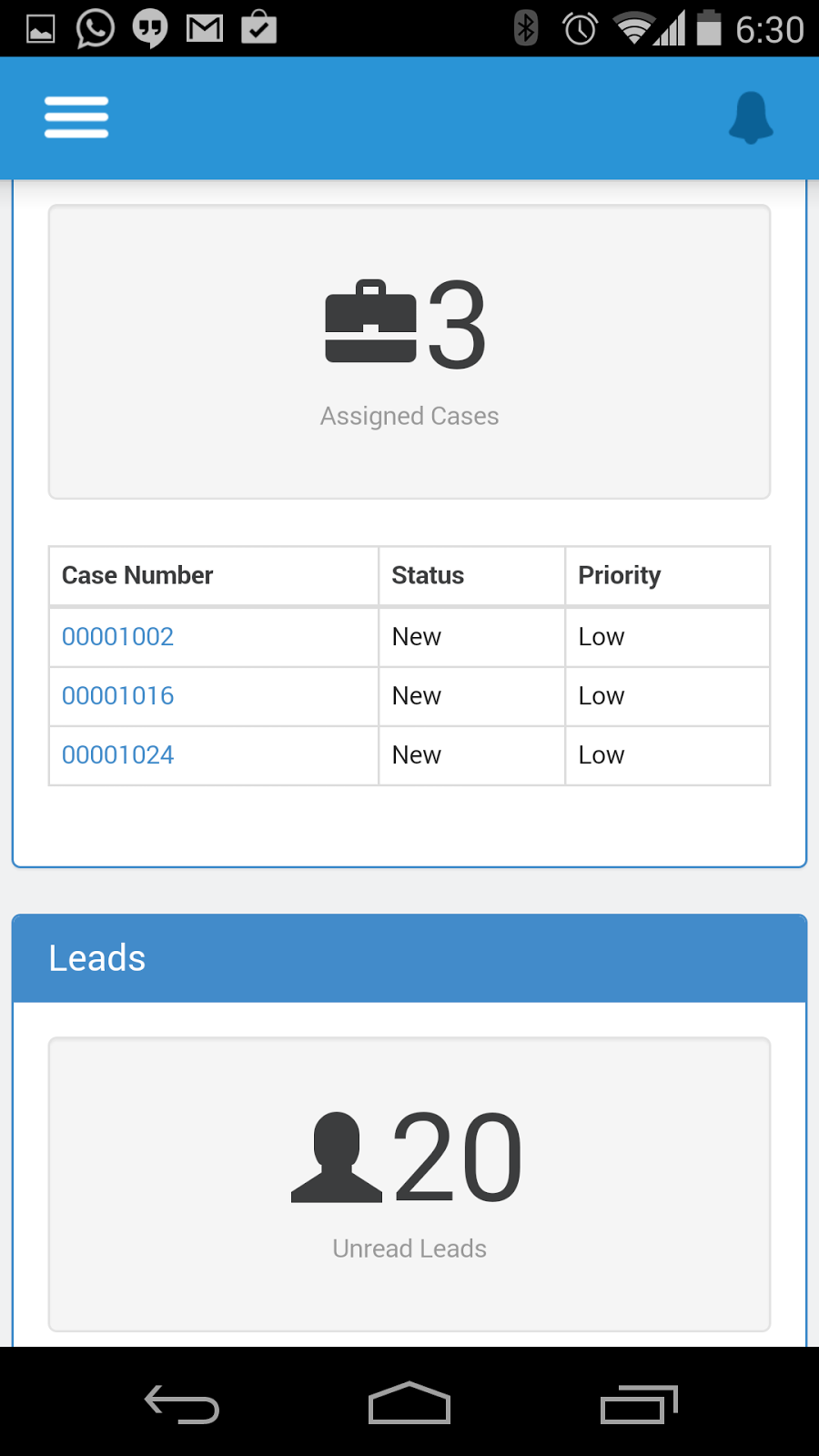
How it looks like on a Mobile Device ?


VSDashboard in the nav menu
The VSDashBoard page
   
Detail Pages


Wednesday, January 29, 2014


I just seeded a new version of VisualStrap with much more components and added a bit of optimisation to existing css. This blog is more about how you can create your Force.com site page very easily using VisualStrap.

Lets take an example of a site of a Product/Company and talks about its features/offering. The site will be a very simple one, one main block which has the company/product banner and some other small blocks that talks about the features.


The Design


The Design
To achieve the above design we will basically need the following stuff


  • navbar (header & footer)
  • well (for features and some minor items)
  • column (grid)
  • row (grid)
  • jumbotron (Highlighted main panel)


Desktop View

Mobile View (the column type/class "col-md-4" makes the blocks stack on devices with lower screen resolution)

So finally the actual page uses


  • navbar
  • well
  • column (grid)
  • row (grid)
  • button
  • modal
  • glyph
  • jumbotron


The Code


<apex:page showHeader="false" docType="html-5.0" >  
   <vs:importvisualstrap />  
   <style>  
     body{  
         font-family: "Helvetica Neue", Helvetica, Arial, sans-serif;  
       }  
     .intro{  
       margin-top:20px;  
       font-size:140%;  
       font-weight: 200;  
     }  
   </style>  
   <vs:visualstrapblock >  
     <apex:form >  
       <!--header -->  
       <vs:navbar brand="Blogforce9" inverse="true" type="fixed-top">  
         A site about VisualStrap  
       </vs:navbar>  
       <!-- highlighted content -->  
       <apex:outputPanel layout="block" styleClass="container" >  
         <apex:outputPanel layout="block" styleClass="jumbotron" style="text-align:center">  
           <h1><vs:glyph icon="bookmark" style="font-size:75%"/> VisualStrap Demo Site</h1>  
           <p>This is a example how VisualStrap can be used to create a site page. All the standard components can be used inside this page without any problem </p>  
           <apex:commandButton styleClass="btn-lg btn-success" value="Submit Request" html-data-toggle="modal" html-data-target="#newRequest"/>  
         </apex:outputPanel>  
       </apex:outputPanel>  
       <!-- the feature section -->  
       <apex:outputPanel layout="block" styleClass="container" >  
         <apex:outputPanel layout="block" styleClass="row">  
           <apex:outputPanel layout="block" styleClass="col-md-4">  
             <apex:outputPanel layout="block" styleClass="well">  
               <h3>   
                 <vs:glyph icon="cog"/> Optimized  
               </h3>  
               <div class="intro" >VisualStrap is based on Bootstrap 3. It uses a wrapper style class to designate the areas where actual theming using bootstrap is required. VisualStrap CSS is optimized to work with Visualforce pages even with standard stylesheet and header on.</div>  
             </apex:outputPanel>  
           </apex:outputPanel>  
           <apex:outputPanel layout="block" styleClass="col-md-4">  
             <apex:outputPanel layout="block" styleClass="well">  
               <h3>   
                 <vs:glyph icon="retweet"/> Flexible  
               </h3>  
               <div class="intro" >VisualStrap is based on bootstrap there are many components available in the package that can be used to create pages. If are aware about bootstrap components you can directly implement them in page without using components </div>  
             </apex:outputPanel>  
           </apex:outputPanel>  
           <apex:outputPanel layout="block" styleClass="col-md-4">  
             <apex:outputPanel layout="block" styleClass="well">  
               <h3>   
                 <vs:glyph icon="tasks"/> Components  
               </h3>  
               <div class="intro" >There are many components available in the package that makes Bootstrap/VisualStrap implementation inside a page very easy. These components handles most of the styling based on a very familiar syntax</div>  
             </apex:outputPanel>  
           </apex:outputPanel>  
         </apex:outputPanel>  
       </apex:outputPanel>  
       <!-- footer -->  
       <vs:navbar brand="Blogforce9" inverse="true" type="fixed-bottom" layout="none">  
         <center>  
           <apex:outputPanel styleClass="text-muted" style="margin:20px;font-size:130%" layout="block">  
             <vs:glyph icon="bullhorn"/> Site powered by Force.com  
           </apex:outputPanel>  
         </center>  
       </vs:navbar>  
       <!-- the modal form-->  
       <vs:modal title="New Request" id="newRequest">  
         <apex:pageBlock mode="maindetail">  
           <apex:pageBlockSection >  
             <apex:pageBlockSectionItem >  
               <apex:outputLabel >First Name</apex:outputLabel>  
               <apex:input type="text"/>  
             </apex:pageBlockSectionItem>  
             <apex:pageBlockSectionItem >  
               <apex:outputLabel >Last Name</apex:outputLabel>  
               <apex:input type="text"/>  
             </apex:pageBlockSectionItem>  
             <apex:pageBlockSectionItem >  
               <apex:outputLabel >Email</apex:outputLabel>  
               <apex:input type="text"/>  
             </apex:pageBlockSectionItem>  
           </apex:pageBlockSection>  
         </apex:pageBlock>  
         <apex:outputPanel styleClass="modal-footer" layout="block">  
           <apex:commandButton value="Close" styleClass="btn-warning" html-data-dismiss="modal"/>  
           <apex:commandButton value="Save Request" styleClass="btn-success" html-data-dismiss="modal"/>  
         </apex:outputPanel>  
       </vs:modal>  
     </apex:form>  
   </vs:visualstrapblock>  
 </apex:page>


To use the above code you need to install the latest version of VisualStrap from the below link. If you are using the source files from Github to install the components replace the "vs:" in the above code with "c:".

Important Notice : There is a bug in platform related to Managed Package only due to which salesforce is not able to resolve the namespace name properly. I have a ticket raised with salesforce but its still open. Meanwhile if you face issues with it you can use the source from the Github or use the Unmanaged Package


Thursday, January 9, 2014


Few days ago I introduced a set of components called "VisualStrap" which will bring the BootStrap to VisualForce pages very easily. VisualStrap is still work in progress , I am adding new components and improving it whenever I get time.

Till now, I was able to document about most of the components but the documentation needs much more than just description rather may be some examples, showing the capability of the package.

Here are some very first examples.

Case Overview Page 


A simple highlight bar style page that gives a quick glance of the Case. This page demonstrates the use of some common VisualStrap components and how VisualStrap grid works.


This page mainly uses the following VisualStrap components

  • row
  • column
  • glyph
  • well
  • panel

<apex:page standardController="Case" sidebar="false" docType="html-5.0">  
   <style>  
     .glow{  
        animation: flashBg 0.9s;  
        -webkit-animation: flashBg 0.9s alternate infinite;  
     }  
     @keyframes flashBg  
     {  
       from {  
           border: 3px solid #ff6161;  
          }  
       to {  
           border: 3px solid #ffd324;  
         }  
     }  
     @-webkit-keyframes flashBg /* Safari and Chrome */  
     {  
       from {  
           border: 3px solid #ff6161;  
          }  
       to {  
           border: 3px solid #ffd324;  
           box-shadow: 0px 0px 50px 3px #e14f1c;  
         }  
     }  
   </style>  
   <vs:importvisualstrap />  
   <vs:visualstrapblock >  
     <vs:panel type="primary" title="Case Overview">  
       <vs:row >  
         <vs:column type="col-md-3">  
           <div class="glow">  
             <vs:well style="text-align:center">                
               <vs:row >  
                 <vs:column type="col-md-4" style="font-size:54px">  
                   <vs:glyph icon="time" style="color:red"/>              
                 </vs:column>  
                 <vs:column type="col-md-8">                  
                   <h2>  
                     {!ROUND(NOW() - Case.CreatedDate,0)}  
                   </h2>  
                   <p class="text-muted infolabel">Days waiting for response</p>              
                 </vs:column>  
               </vs:row>                
             </vs:well>  
           </div>   
         </vs:column>  
         <vs:column type="col-md-3">  
           <vs:well style="text-align:center">  
             <vs:row >  
               <vs:column type="col-md-4" style="font-size:54px">  
                 <vs:glyph icon="flag"/>              
               </vs:column>  
               <vs:column type="col-md-8">                  
                 <h2>  
                   {!Case.Status}  
                 </h2>  
                 <p class="text-muted infolabel">Current case status</p>              
               </vs:column>  
             </vs:row>  
           </vs:well>  
         </vs:column>  
         <vs:column type="col-md-3">  
           <vs:well style="text-align:center">  
             <vs:row >  
               <vs:column type="col-md-4" style="font-size:54px">  
                 <vs:glyph icon="filter"/>              
               </vs:column>  
               <vs:column type="col-md-8">                  
                 <h2>  
                   {!Case.Type}  
                 </h2>  
                 <p class="text-muted infolabel">Case Type</p>              
               </vs:column>  
             </vs:row>  
           </vs:well>  
         </vs:column>  
         <vs:column type="col-md-3">  
           <vs:well style="text-align:center">  
             <vs:row >  
               <vs:column type="col-md-4" style="font-size:54px">  
                 <vs:glyph icon="comment"/>              
               </vs:column>  
               <vs:column type="col-md-8">                  
                 <p>  
                   {!Case.Subject}  
                 </p>  
                 <p class="text-muted infolabel">Subject</p>              
               </vs:column>  
             </vs:row>  
           </vs:well>  
         </vs:column>  
       </vs:row>  
     </vs:panel>  
   </vs:visualstrapblock>  
   <apex:detail title="false"/>  
 </apex:page> 

User Dashboard Page


This page is a simple dashboard that gives user about the daily information that they need.  Like pending activities for the day, assigned cases, assigned leads, last viewed Accounts/contacts. 


[The layout is mobile friendly try opening the link in a iPad or try to scale down your browser window. The blocks will stack according to screen real estate]

This page mainly uses the following VisualStrap components
  • row
  • column
  • glyph
  • alert
  • panel
  • tables
  • well


<apex:page sidebar="false" docType="html-5.0" controller="VSDashBoard_Con">  
   <vs:importvisualstrap />  
   <vs:visualstrapblock >  
     <center>  
       <vs:pageheader title="User Dashboard" icon="calendar" subtitle="{!$User.FirstName} {!$User.LastName}"/>  
     </center>  
     <vs:row >  
       <vs:column type="col-md-4">  
         <vs:panel title="Tasks" type="primary">  
           <vs:well style="text-align:center;">  
              <vs:glyph icon="tasks" style="font-size:40px"/> &nbsp;<span style="font-size:54px">{!Tasks.size}</span>  
              <p class="text-muted">Tasks due for Today</p>  
           </vs:well>  
           <apex:dataTable value="{!Tasks}" var="task" styleClass="table table-condensed table-hover table-bordered" rows="3">  
             <apex:column headerValue="Subject">  
               <apex:outputLink value="/{!task.Id}">{!task.Subject}</apex:outputLink>  
             </apex:column>  
             <apex:column value="{!task.Status}" headerValue="Status"/>  
             <apex:column value="{!task.ActivityDate}" headerValue="Due Date"/>  
           </apex:dataTable>  
           <vs:alert rendered="{!Tasks.empty}" type="success" style="text-align:center">  
             <vs:glyph icon="ok-sign"/> No records to display  
           </vs:alert>  
         </vs:panel>  
       </vs:column>  
       <vs:column type="col-md-4">  
         <vs:panel title="Cases" type="primary">  
           <vs:well style="text-align:center;">  
              <vs:glyph icon="briefcase" style="font-size:40px"/>&nbsp;<span style="font-size:54px">{!Cases.size}</span>  
              <p class="text-muted">Assigned Cases</p>  
           </vs:well>  
           <apex:dataTable value="{!Cases}" var="case" styleClass="table table-condensed table-hover table-bordered" rows="3">  
             <apex:column headerValue="Case Number">  
               <apex:outputLink value="/{!case.Id}">{!case.CaseNumber}</apex:outputLink>  
             </apex:column>  
             <apex:column value="{!case.Status}" headerValue="Status"/>  
             <apex:column value="{!case.Priority}" headerValue="Priority"/>  
           </apex:dataTable>  
           <vs:alert rendered="{!Cases.empty}" type="warning" style="text-align:center">  
             <vs:glyph icon="exclamation-sign"/> No records to display  
           </vs:alert>  
         </vs:panel>  
       </vs:column>  
       <vs:column type="col-md-4">  
         <vs:panel title="Leads" type="primary">  
           <vs:well style="text-align:center;">  
              <vs:glyph icon="user" style="font-size:40px"/>&nbsp;<span style="font-size:54px">{!Leads.size}</span>  
              <p class="text-muted">Unread Leads</p>  
           </vs:well>  
           <apex:dataTable value="{!Leads}" var="lead" styleClass="table table-condensed table-hover table-bordered" rows="3">  
             <apex:column headerValue="Name">  
               <apex:outputLink value="/{!lead.Id}">{!lead.Name}</apex:outputLink>  
             </apex:column>  
             <apex:column value="{!lead.Status}" headerValue="Status"/>  
             <apex:column value="{!lead.CreatedDate}" headerValue="Created Date"/>  
           </apex:dataTable>  
           <vs:alert rendered="{!Leads.empty}" type="warning" style="text-align:center">  
             <vs:glyph icon="exclamation-sign"/> No records to display  
           </vs:alert>  
         </vs:panel>  
       </vs:column>        
     </vs:row>  
     <vs:row >  
       <vs:column type="col-md-6">  
         <vs:panel title="Last Viewed Accounts" type="primary">  
           <apex:dataTable value="{!Accounts}" var="acc" styleClass="table table-condensed table-hover table-bordered" >  
             <apex:column headerValue="Name">  
               <apex:outputLink value="/{!acc.Id}">{!acc.Name}</apex:outputLink>  
             </apex:column>  
             <apex:column value="{!acc.Type}" headerValue="Type"/>  
             <apex:column value="{!acc.BillingState}" headerValue="State"/>  
           </apex:dataTable>  
           <vs:alert rendered="{!Accounts.empty}" type="warning" style="text-align:center">  
             <vs:glyph icon="exclamation-sign"/> No records to display  
           </vs:alert>  
         </vs:panel>  
       </vs:column>  
       <vs:column type="col-md-6">  
         <vs:panel title="Last Viewed Contacts" type="primary">  
           <apex:dataTable value="{!Contacts}" var="contact" styleClass="table table-condensed table-hover table-bordered" rows="3">  
             <apex:column headerValue="Name">  
               <apex:outputLink value="/{!contact.Id}">{!contact.Name}</apex:outputLink>  
             </apex:column>  
             <apex:column value="{!contact.Phone}" headerValue="Phone"/>  
             <apex:column value="{!contact.Department}" headerValue="Department"/>  
           </apex:dataTable>  
           <vs:alert rendered="{!Contacts.empty}" type="warning" style="text-align:center">  
             <vs:glyph icon="exclamation-sign"/> No records to display  
           </vs:alert>  
         </vs:panel>  
       </vs:column>    
     </vs:row>  
   </vs:visualstrapblock>  
 </apex:page>  


 public without sharing class VSDashBoard_Con {  
   public List<Task> getTasks(){  
     return [SELECT Id,Subject,Status, ActivityDate FROM Task WHERE ActivityDate = TODAY AND Status != 'Completed' AND Status != 'Deferred'];  
   }  
   public List<Case> getCases(){  
     return [SELECT Id,CaseNumber,Status,Subject, Priority FROM Case WHERE OwnerId=:UserInfo.getUserId() AND isClosed = FALSE];  
   }  
   public List<Lead> getLeads(){  
     return [SELECT Id,Name,Status, CreatedDate FROM Lead WHERE OwnerId=:UserInfo.getUserId() AND IsUnreadByOwner = true];  
   }  
   public List<Account> getAccounts(){  
     return [SELECT Id,Name,BillingState,Type FROM Account ORDER BY LastViewedDate DESC limit 5 ];  
   }  
   public List<Contact> getContacts(){  
     return [SELECT Id,Name,Phone, Department FROM Contact ORDER BY LastViewedDate DESC limit 5 ];  
   }  
 }  

Please Note : You can use <apex:outputPanel layout="block" styleClass="row"> or <div class="row"> instead of <vs:row>. Similarly you can use <apex:outputPanel layout="block" styleClass="col-md-4"> or <div class="col-md-4"> instead of <vs:column type="col-md-4"> . And you can also use Bootstrap components inside the pages

VisualStrap is not limited to just these two pages, it can be leveraged to do much more. People out there can extend this to do much more ! Visualstrap is available as Managed package and as well as github. You can grab the same from the project detail page.

To make the above examples work you have to install VisualStrap from project page below. "vs" is namespace prefix from the managed package, if you are using the source from github you may have to replace "vs:" with just "c:".


Saturday, December 14, 2013


After around months of playing with Bootstrap and Visualforce here is a first version of "VisualStrap". VisualStrap is a set of components that work inside your visualforce page without affecting the standard layouts (if you directly import Bootstrap inside a VF page it will mess up the whole page).

With VisualStrap you can make your VF pages more appealing to user , more responsive and more user friendly. Currently the below set components are Bootstrap are converted into VisualStrap but I am working hard to bring them all.

What you get with this version of VisualStrap ?  

  • Panels
  • Alert
  • Well
  • Label
  • Badges
  • Jumbotron
  • Forms (Vertical and Horizontal)
  • Glyphicons
  • Thumbnails
  • Column and Rows (Grid) 
  • Tables (new 1.1)
  • Buttons (new 1.1)
  • ButtonGroup (new in v1.3)
  • ButtonToolBar (new in v1.3
  • Pageheader (new in v1.3)
  • Progressbar (new in v1.3)
  • Tooltip (new in v1.4)
  • List Group and List Group Item (new in v1.4)
  • Modal (new in v1.4)
  • Navbar (new in v1.4)
 VisualStrap is  available as a managed package so that it will be easy for users to upgrade it whenever a new release is released (Source is available @Github please check the project detail page) 


Where can you use it ?

Almost everywhere! But you can consider VisualStrap for pages that are exposed as Salesforce Sites or in Customer Portal. 

To get started and create some awesome UI  please follow the project link below

Documentation & Installation 

Please visit the Project page for documentation, Installation and Github link.