Thursday, March 13, 2014
Salesforce has recently unveiled the new Salesforce1 app that lets you create mobile app very easily using technologies like JS, Visualforce and HTML and yes of course you can use VisualStrap create mobile ready pages.
Since Visualstrap is based on Bootstrap it inherits all the features from Bootstrap. Its a very powerful, sleek, front-end framework that lets you create mobile ready pages very fast!
Creating a Visualforce Page "VSDashboardS1"
So lets start with a User Dashboard / Overview page that we talked earlier here
http://blogforce9.blogspot.in/2014/01/visualstrap-possibilities.html
 |
| Desktop View |
Prerequisite
Few things that needs to be considered
- Desktop & Mobile support : Since we are going to support the page both on desktop and mobile we need to find a way to stack the grids on mobile devices so that they can be easily viewed. This can be easily done by using proper grid classes.
- Navigation : We have to make sure all the links are updated, so that every thing works with Salesforce1 and Desktop
- Responsive : The page needs to be responsive so that it fits in the screen of different mobile devices.
Desktop & Mobile support
To make sure the grids properly stack up according to devices we should have to select proper column/ grid classes. In this example we are going to have three blocks per row, since a row in Bootstrap is of 12, each block should span to 4 units, hence the type "col-md-4"
<vs:row>
   <vs:column type="col-md-4">
           ...
   </vs:column>
   <vs:column type="col-md-4">
           ...
   </vs:column>
   <vs:column type="col-md-4">
           ...
   </vs:column>
 </vs:row>
col-md-* classes are displayed in single row in a device with regular display where as they get stacked in mobile devices with smaller displays.
Navigation
We have to make sure navigation works for both Salesforce1 and desktop, this can be done by detecting whether the app is viewed in Salesforce1 or Desktop. Have a look at the below JS function , the function checks whether "sforce.one" exists (which exists for Salesforce1) and switches the navigation method accordingly.
function goToDetailPage(recId){
       if(typeof sforce != 'undefined' && typeof sforce.one != 'undefined'){
         sforce.one.navigateToSObject(recId);
       }
       else{
         window.location.href = '/'+recId;
       }
       return false;
     }
Responsive
Visualstrap grid classes are all responsive and hence they will adapt according to screen width.
The Design
To make sure the page uses all the real estate available on the screen, the page should be stacked vertically for mobile where as it should span horizontally for desktop. This is generally done use grid classes.
 |
| Desktop layout |
 |
| Mobile Layout |
VF Page
<apex:page sidebar="false" docType="html-5.0" controller="VSDashBoard_Con">
<vs:importvisualstrap />
<script>
function goToDetailPage(recId){
if(typeof sforce != 'undefined' && typeof sforce.one != 'undefined'){
sforce.one.navigateToSObject(recId);
}
else{
window.location.href = '/'+recId;
}
return false;
}
</script>
<vs:visualstrapblock style="padding:5px" >
<center>
<vs:pageheader title="User Dashboard" icon="calendar" subtitle="{!$User.FirstName} {!$User.LastName}"/>
</center>
<vs:row >
<vs:column type="col-md-4">
<vs:panel title="Tasks" type="primary">
<vs:well style="text-align:center;">
<vs:glyph icon="tasks" style="font-size:40px"/> <span style="font-size:54px">{!Tasks.size}</span>
<p class="text-muted">Tasks due for Today</p>
</vs:well>
<apex:dataTable value="{!Tasks}" var="task" styleClass="table table-condensed table-hover table-bordered" rows="3">
<apex:column headerValue="Subject">
<apex:outputLink onclick="goToDetailPage('{!task.Id}')">{!task.Subject}</apex:outputLink>
</apex:column>
<apex:column value="{!task.Status}" headerValue="Status"/>
<apex:column value="{!task.ActivityDate}" headerValue="Due Date"/>
</apex:dataTable>
<vs:alert rendered="{!Tasks.empty}" type="success" style="text-align:center">
<vs:glyph icon="ok-sign"/> No records to display
</vs:alert>
</vs:panel>
</vs:column>
<vs:column type="col-md-4">
<vs:panel title="Cases" type="primary">
<vs:well style="text-align:center;">
<vs:glyph icon="briefcase" style="font-size:40px"/> <span style="font-size:54px">{!Cases.size}</span>
<p class="text-muted">Assigned Cases</p>
</vs:well>
<apex:dataTable value="{!Cases}" var="case" styleClass="table table-condensed table-hover table-bordered" rows="3">
<apex:column headerValue="Case Number">
<apex:outputLink onclick="return goToDetailPage('{!case.Id}')" >{!case.CaseNumber}</apex:outputLink>
</apex:column>
<apex:column value="{!case.Status}" headerValue="Status"/>
<apex:column value="{!case.Priority}" headerValue="Priority"/>
</apex:dataTable>
<vs:alert rendered="{!Cases.empty}" type="warning" style="text-align:center">
<vs:glyph icon="exclamation-sign"/> No records to display
</vs:alert>
</vs:panel>
</vs:column>
<vs:column type="col-md-4">
<vs:panel title="Leads" type="primary">
<vs:well style="text-align:center;">
<vs:glyph icon="user" style="font-size:40px"/> <span style="font-size:54px">{!Leads.size}</span>
<p class="text-muted">Unread Leads</p>
</vs:well>
<apex:dataTable value="{!Leads}" var="lead" styleClass="table table-condensed table-hover table-bordered" rows="3">
<apex:column headerValue="Name">
<apex:outputLink onclick="return goToDetailPage('{!lead.Id}')" >{!lead.Name}</apex:outputLink>
</apex:column>
<apex:column value="{!lead.Status}" headerValue="Status"/>
<apex:column value="{!lead.CreatedDate}" headerValue="Created Date"/>
</apex:dataTable>
<vs:alert rendered="{!Leads.empty}" type="warning" style="text-align:center">
<vs:glyph icon="exclamation-sign"/> No records to display
</vs:alert>
</vs:panel>
</vs:column>
</vs:row>
<vs:row >
<vs:column type="col-md-6">
<vs:panel title="Last Viewed Accounts" type="primary">
<apex:dataTable value="{!Accounts}" var="acc" styleClass="table table-condensed table-hover table-bordered" >
<apex:column headerValue="Name">
<apex:outputLink onclick="return goToDetailPage('{!acc.Id}')" >{!acc.Name}</apex:outputLink>
</apex:column>
<apex:column value="{!acc.Type}" headerValue="Type"/>
<apex:column value="{!acc.BillingState}" headerValue="State"/>
</apex:dataTable>
<vs:alert rendered="{!Accounts.empty}" type="warning" style="text-align:center">
<vs:glyph icon="exclamation-sign"/> No records to display
</vs:alert>
</vs:panel>
</vs:column>
<vs:column type="col-md-6">
<vs:panel title="Last Viewed Contacts" type="primary">
<apex:dataTable value="{!Contacts}" var="contact" styleClass="table table-condensed table-hover table-bordered" rows="3">
<apex:column headerValue="Name">
<apex:outputLink onclick="return goToDetailPage('{!contact.Id}')" >{!contact.Name}</apex:outputLink>
</apex:column>
<apex:column value="{!contact.Phone}" headerValue="Phone"/>
<apex:column value="{!contact.Department}" headerValue="Department"/>
</apex:dataTable>
<vs:alert rendered="{!Contacts.empty}" type="warning" style="text-align:center">
<vs:glyph icon="exclamation-sign"/> No records to display
</vs:alert>
</vs:panel>
</vs:column>
</vs:row>
</vs:visualstrapblock>
</apex:page>
Controller
public without sharing class VSDashBoard_Con {
   public List<Task> getTasks(){
     return [SELECT Id,Subject,Status, ActivityDate FROM Task WHERE ActivityDate = TODAY AND Status != 'Completed' AND Status != 'Deferred'];
   }
   public List<Case> getCases(){
     return [SELECT Id,CaseNumber,Status,Subject, Priority FROM Case WHERE OwnerId=:UserInfo.getUserId() AND isClosed = FALSE];
   }
   public List<Lead> getLeads(){
     return [SELECT Id,Name,Status, CreatedDate FROM Lead WHERE OwnerId=:UserInfo.getUserId() AND IsUnreadByOwner = true];
   }
   public List<Account> getAccounts(){
     return [SELECT Id,Name,BillingState,Type FROM Account ORDER BY LastViewedDate DESC limit 5 ];
   }
   public List<Contact> getContacts(){
     return [SELECT Id,Name,Phone, Department FROM Contact ORDER BY LastViewedDate DESC limit 5 ];
   }
 }
Deploying the Page to Salesforce1
- Mark the page VSDashboardS1 "Available for Salesforce mobile apps"
- Add tab to Mobile Navigation Menu
How it looks like on a Mobile Device ?
 |
| VSDashboard in the nav menu |
 |
| The VSDashBoard page |
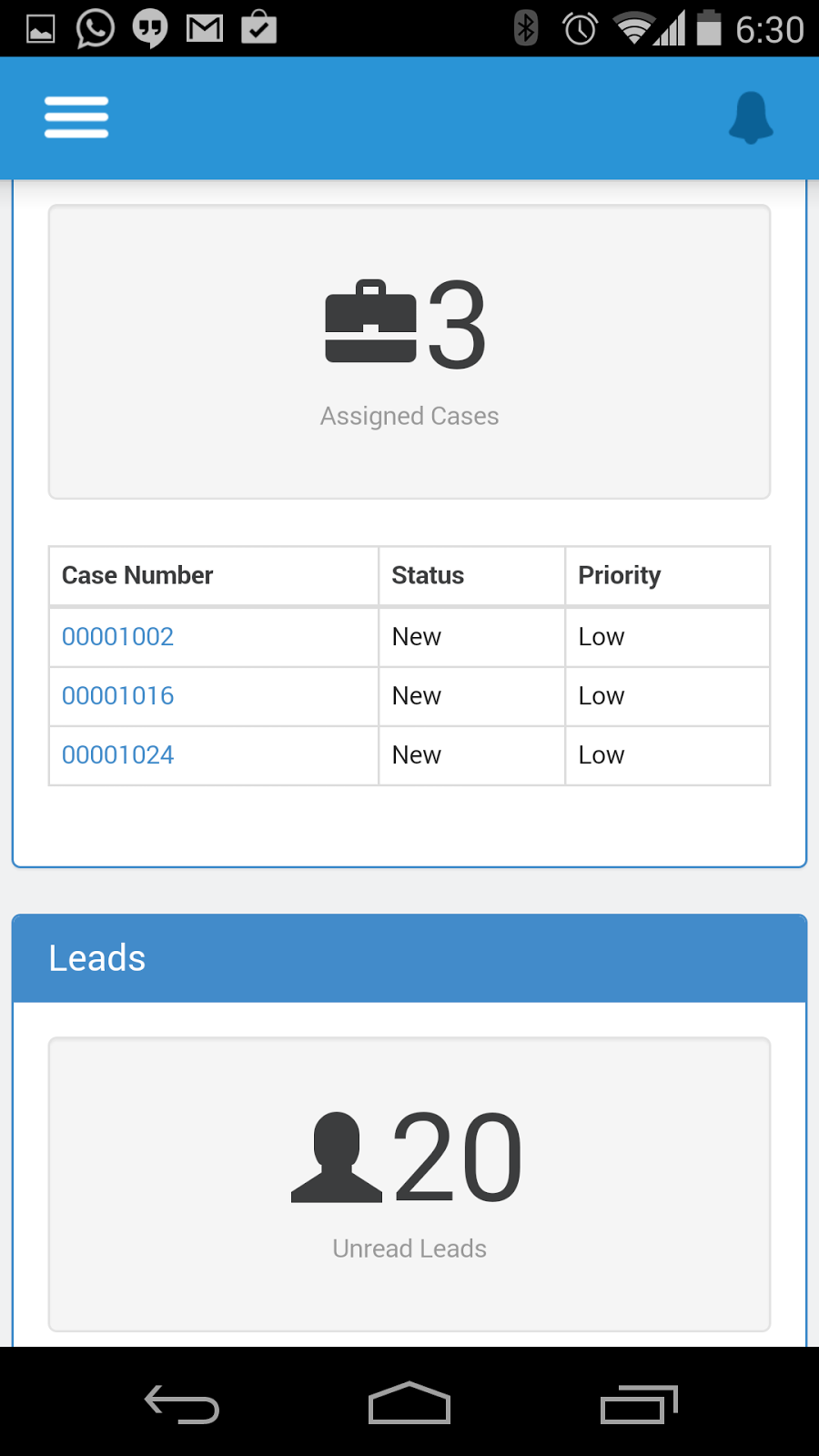 |
| The VSDashBoard page |
  |
Detail Pages
|


